
Documents became electronic. Manual work remained.
Companies receive documents through electronic exchange, email and internal systems. Employees check completeness, enter information into records, compare amounts and terms, identify the responsible person and forward the document package. Even with electronic exchange, much of this work may remain manual.
If every document package requires employee involvement, higher document volumes increase the team’s workload. Automation allows systems to perform repetitive tasks while employees handle exceptions and make decisions.
System capabilities have developed gradually: first converting images into text, then extracting fields, and now helping analyse content. Each stage addresses a different part of the task.
How systems learned to read and analyse documents
OCR converts the image into text. Optical character recognition makes a scan searchable and available for further processing. Employees no longer need to retype the page, but the required information still needs to be found and checked.
Templates extract information according to the rules. In a consistent document layout, a number, date or amount can be found using the field’s position and nearby words. This reduces manual entry. When a counterparty changes the layout, the configuration is checked against new documents.
Machine learning accounts for differences in layout. The model is configured to identify document types and extract the required information from different forms. Configuration and testing require documents with varied layouts from the actual workflow.
Language models extract information following instructions. A model can be asked to find payment terms, summarise an annex or compare the contents of several files. Multimodal models can also use an image of the page. The quality of the analysis is evaluated on the company’s documents.
These approaches work together in a single process. Intelligent document processing, or IDP, combines several technologies: electronic fields are read from the document format, scans undergo OCR, a model extracts information from the content, and rules check the values.
Where AI helps and where existing structured data is sufficient
In electronic document exchange, amounts, tax identification numbers and other details may already be available as structured fields. Integration transfers them into the company’s system. Recognising those details again creates additional work and another opportunity for error.
One package may contain an electronic document, a PDF and scanned annexes. Text is extracted from a PDF with a text layer; a scan must first undergo OCR. The processing method depends on the format and the operation required.
| What is required | Processing approach |
|---|---|
| Retrieve existing electronic data | Format parsing and integration |
| Read a scan | OCR or an image model |
| Check the amount, date or mandatory field | Rule-based checks |
| Find a condition in free text | A model with a defined output format |
| Compare the contents of several files | Retrieval, linking and verification |
Built-in tools in the existing system may also be suitable for standard source accounting documents. For example, 1C:Document Recognition supports several types of source accounting document, with results checked and corrected before documents are created in the database.
The choice depends on the cause of the delay. If employees re-enter electronic fields, integration may remove that step. For reading varied annexes and comparing terms, model quality needs to be assessed. If a document is waiting for its owner, the workflow needs to change. The time for the entire operation is measured after these changes.
Comparing contract wording
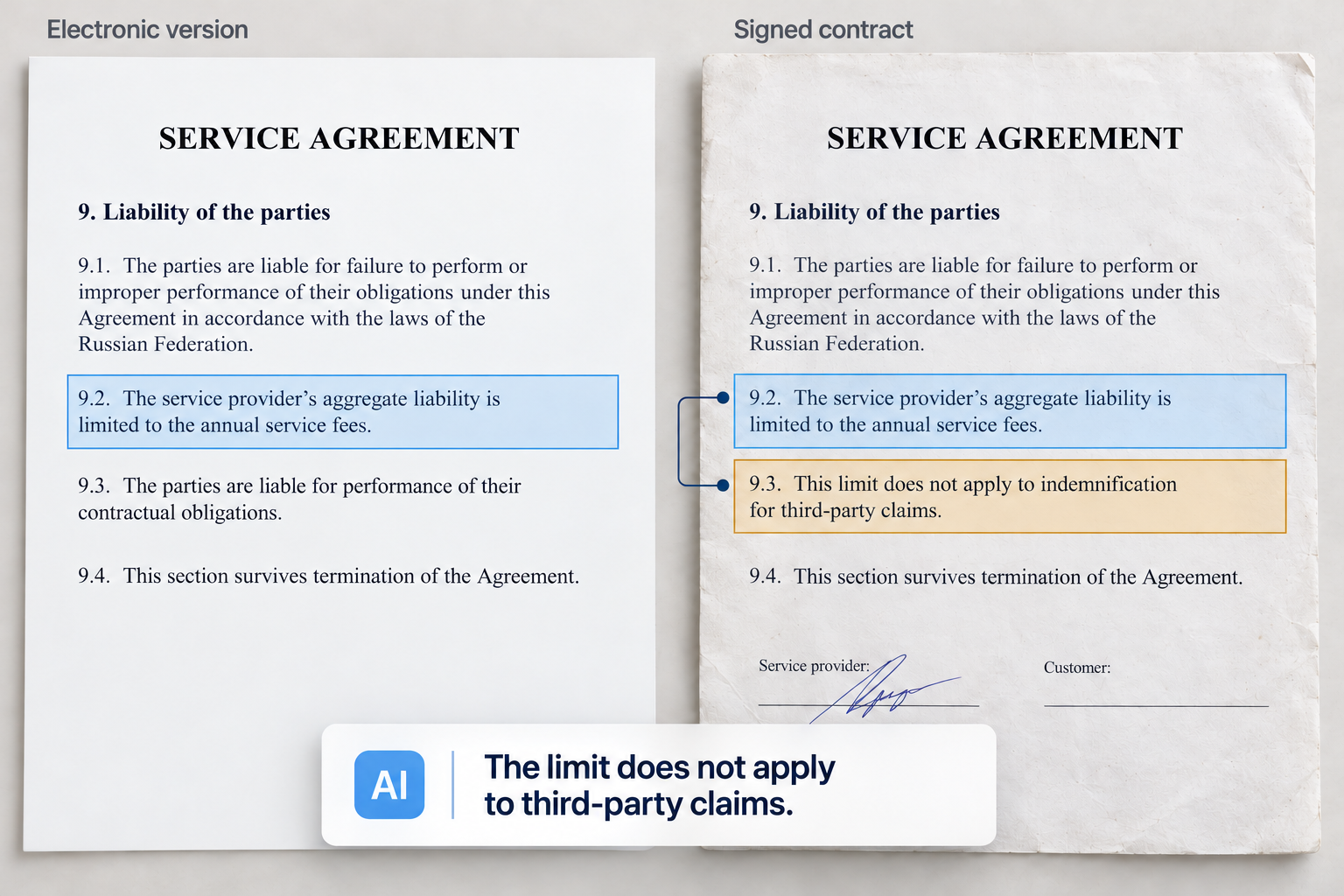
Before signing, or when receiving a signed copy, an employee checks whether the agreed terms have been preserved. In the hypothetical example below, the amount and details match, but an added clause changes the parties’ liability.
Limit matches, exception changes conditions
Clause 9.2 in both versions states: “The service provider’s aggregate liability is limited to the annual service fees.” The signed version adds clause 9.3: “This limit does not apply to indemnification for third-party claims.”
Extracting only the liability limit would produce the same result. Verification requires connecting the exception to that limit. AI can be asked to find both provisions and prepare an explanation with the source excerpts:
The signed version adds an exception in clause 9.3. The limit in clause 9.2 does not apply to indemnification for third-party claims. Before using the contract, check whether this change was agreed.
The employee checks the finding against both versions and decides what to do next. This analysis requires the complete document package, including annexes and addenda.
What other changes can we look for?
Contract checks may also cover payment terms, acceptance procedures, termination grounds, the parties’ obligations and annex provisions. Below are further changes that require comparison of the terms.
One limit for all claims or a separate limit for each The wording “for all claims in aggregate” establishes one overall limit. Replacing it with “for each claim” changes how that same limit applies. The check must extract both the limit and the claims to which it applies.
Amounts paid or amounts payable. Adding “or payable” changes the basis for calculating liability. Even with the same percentage, the final limit may differ. Verification requires the definition of payments, the calculation period and the conditions under which an amount is deemed payable.
The contract or an annex that takes precedence If an annex takes precedence in the event of a conflict, a provision in it may change the effect of the main contract. The analysis must therefore cover the full package and account for the agreed order of precedence.
Another use case: an AI assistant for incoming documents
The description in an electronic document exchange record does not always reveal what the attached file contains. An AI document assistant can compare the record’s name and description with the actual content, identifying the document type, counterparty, contract and purpose of the package.
For example, a document is labelled “Certificate of completed work”, but the attachment contains a progress report without the certificate. The assistant flags the discrepancy and shows the source excerpt. Under the defined rules, the package is sent to an employee for clarification before it enters the approval workflow.
The AI document assistant can also check referenced annexes, summarise the package and identify the responsible department. The company defines routing rules and the cases in which an employee must verify the result.
How to organise result verification
Each operation has criteria for automated processing and grounds for referral to an employee. For some operations, rule-based checks of mandatory fields and amounts are sufficient. Others require a responsible specialist to assess the content.
The processing result is stored with the source document, its identifier and version. Next to an extracted value or model finding, employees should see the excerpt on which it is based. This lets them verify the result and correct errors without searching the entire package again.
A model may miss information, connect documents incorrectly or use an outdated version. Unreadable scans, missing annexes, conflicting data and service failures are referred to a designated owner. Before launch, the team checks how employees receive these tasks and continue the work.
The assistant receives access to the documents and information needed for its task. Model hosting and storage of data and logs are aligned with organisational requirements. Instructions inside an incoming document are treated as data; they must not alter application rules or the assistant’s permissions.
How to connect document analysis to work in 1C
Extracted information and check results are needed in the system where employees approve documents and maintain records. Content analysis is connected to completing records, preparing document packages and assigning tasks to the responsible employees.
KT’s solution integrates 1C:Document Management with Kontur.Diadoc and an AI assistant for analysing the document flow. Diadoc handles exchange with counterparties; 1C:Document Management supports the company’s internal work. The AI assistant analyses document content. Its tasks and output format are defined when configuring the process.
Configuration establishes which documents arrive, what information the next participant needs and the rules for forwarding the package. It also defines checks and exception routes. Subsequent approval, signing and accounting depend on process rules and employee authority.
In the next article, we will examine this integration in work with source accounting documents and 1C, from receiving documents through Diadoc to using the analysis results.

How many staff hours can be freed up
Time is calculated across the entire document flow. The hypothetical calculation below assumes 2,000 source accounting document packages per month, with an average of 12 minutes of employee work per package before automation and 1.8 minutes afterwards. The difference is 340 staff hours per month.
In this scenario, most packages are processed without employee involvement. Employees handle exceptions, correct errors and perform the checks required by the process. The 1.8 minutes is therefore an average across the entire flow: total employee time is divided by all packages, including those processed automatically.
The calculation includes all employee actions: processing, checking results and making corrections. Waiting for approval or a counterparty’s response is measured separately. The hours freed up allow employees to process more documents or perform other tasks.
Calculate staff hours freed up
Time for exceptions and checks is included in the average for all packages.
2 000 × (12 − 1,8) ÷ 60
staff hours freed up per monthHow to start automation
The initial test focuses on one recurring operation, such as checking completeness or preparing a source accounting document package for approval. The process owner describes incoming documents, employee actions and the processing result. The team measures current time spent and defines acceptable errors.
Test documents are drawn from the working flow: normal packages, new formats, poor scans, corrected versions and incomplete sets. They are used to evaluate data extraction, rule-based checks and the model’s content analysis.
Documents used for configuration are kept separate from the final evaluation. Results are compared with a prepared reference and the existing process. The evaluation checks critical fields, missed discrepancies, correction time, data transfer and recovery after failure.
Evaluation results determine the next action: launch the operation, refine it or change the processing method. If integration removes the main delay, its contribution to reducing manual work is measured first.