
Pilots do not enter production
The team sees AI’s potential but cannot establish ownership, quality criteria, integrations or ongoing operations.
We help select AI use cases with measurable benefits, connect enterprise knowledge and data, establish permissions, quality standards and accountability, and bring assistants into regular operation.
Discuss your needs →The team sees AI’s potential but cannot establish ownership, quality criteria, integrations or ongoing operations.
The employee receives the text, but does not understand which version of the document is used and whether it is possible to rely on the answer.
The result remains in a separate chat and then manually transferred to a task, document, card or analytical material.
Roles, logs, confirmation rules, escalation and conditions for stopping the use case after an error are not defined.
Many companies have tested AI for search, documents, enquiries and analytical briefs. Initial demonstrations look promising, but the pilot often leaves questions unanswered: which work does the assistant actually take on, where is the result recorded and who is responsible for errors?
An AI use case depends on enterprise knowledge, access permissions, data quality and the operational workflow. If an assistant gives answers without sources, works outside the process or takes actions without oversight, it soon becomes another unmanaged channel for processing information.
This practice turns AI experiments into a managed operational framework: defining the task, connecting authorised knowledge and data, limiting authority, setting quality standards and incorporating results into the working system.
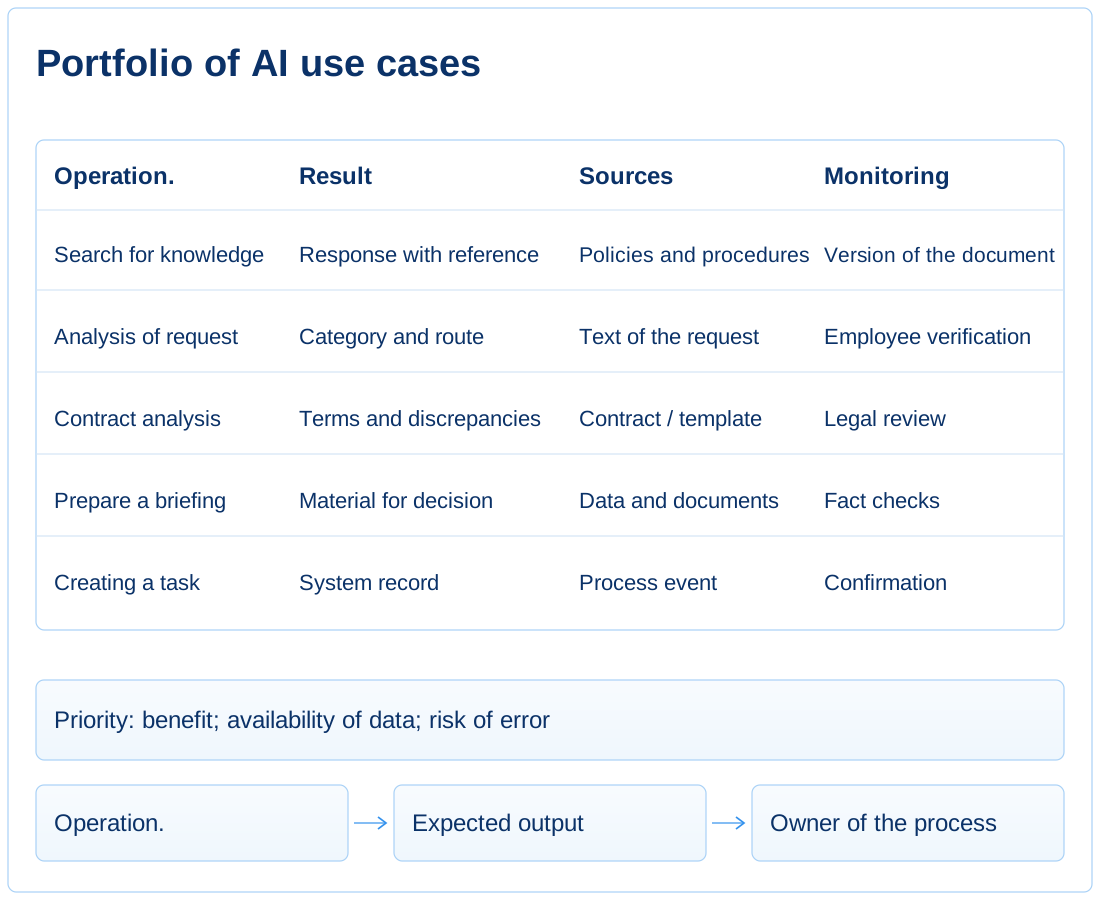
A use case is defined by its inputs, expected result, current effort, place in the process and the next employee or system action.
The operation, output, workload, input source and location where the answer is recorded.
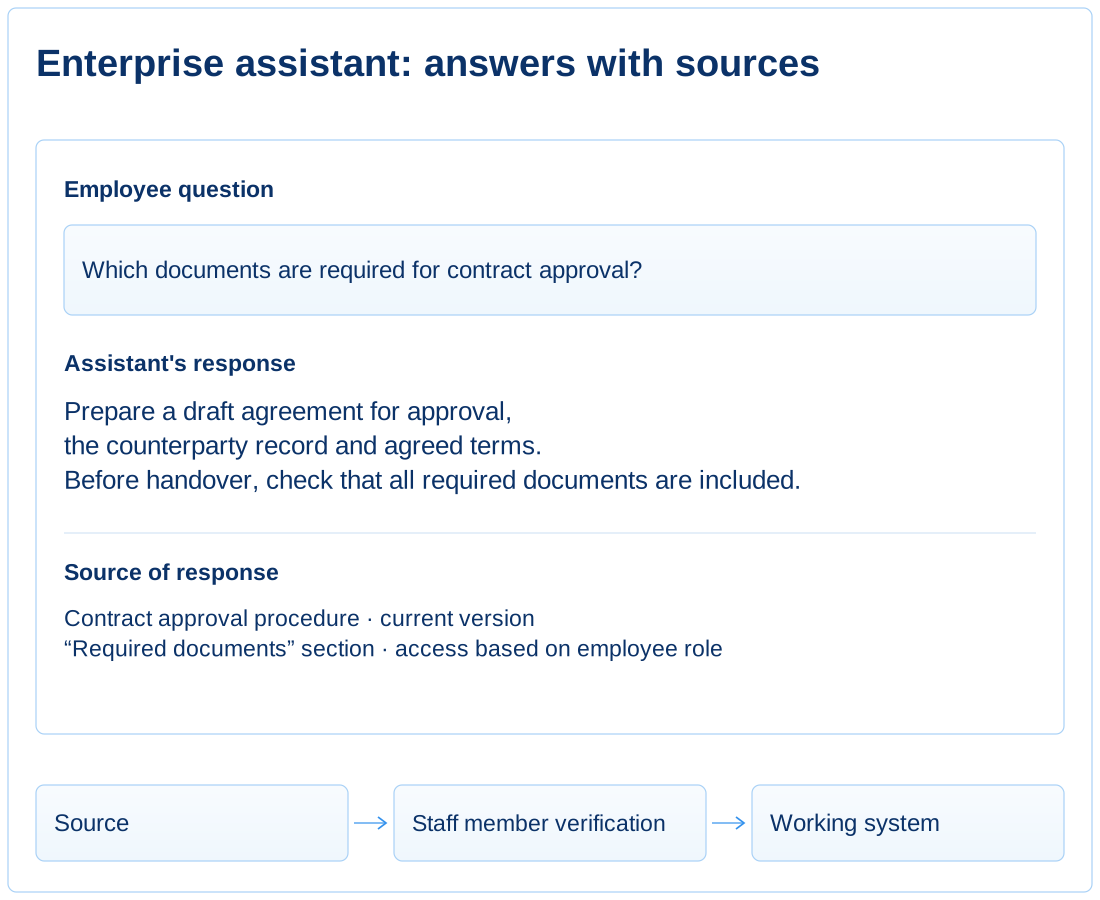
AI only accesses authorized documents, data, and systems, uses current versions, and shows the source of the response.
Sources, access roles, versions, data limitations, and citation rules.
AI’s authority depends on the risk of error, from suggestions for employees to an agent with limited permissions, logging and mandatory confirmation of critical actions.
Quality criteria, levels of autonomy, owner, activity log and escalation rules.
The model creates value through a specific task: reducing the work involved in searching, comparing, classifying, preparing a response or carrying out a limited action.
Each use case has defined limits of autonomy, knowledge sources, access permissions, quality criteria and a destination for its results.
We start with the workload and enterprise knowledge, design a secure AI environment, test quality against routine and critical examples, and then integrate the use case into the process.
Identify where employees regularly search, match, classify, retrieve, and transfer information between documents, systems, and communications.
AI is seen as a common tool, not as a way to change a specific operation with an understandable load and result.
We capture scenarios, transaction volume, error risk, data availability, process owner, and expected effect.
For each scenario, it is clear what work it cuts, what result it creates, and where it is used.
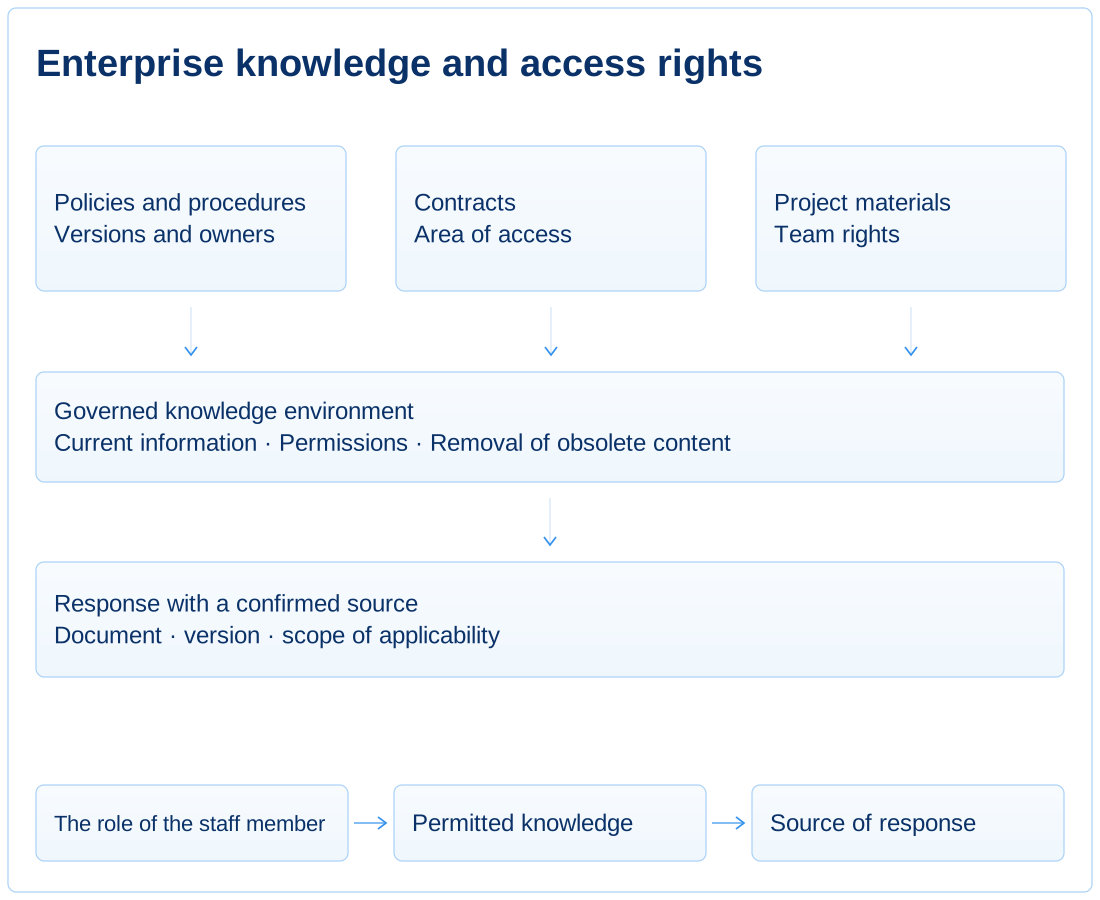
Form a managed knowledge base: documents, regulations, contracts, project materials, data and system events with versions and access rights.
Answers are built on disparate files and do not always take into account the current version, the owner of the document and access restrictions.
We define sources, update rules, access roles, source citations and procedures for removing outdated material.
The answer comes with a source, version, and scope, and the assistant doesn’t see more data than an employee with the same role.
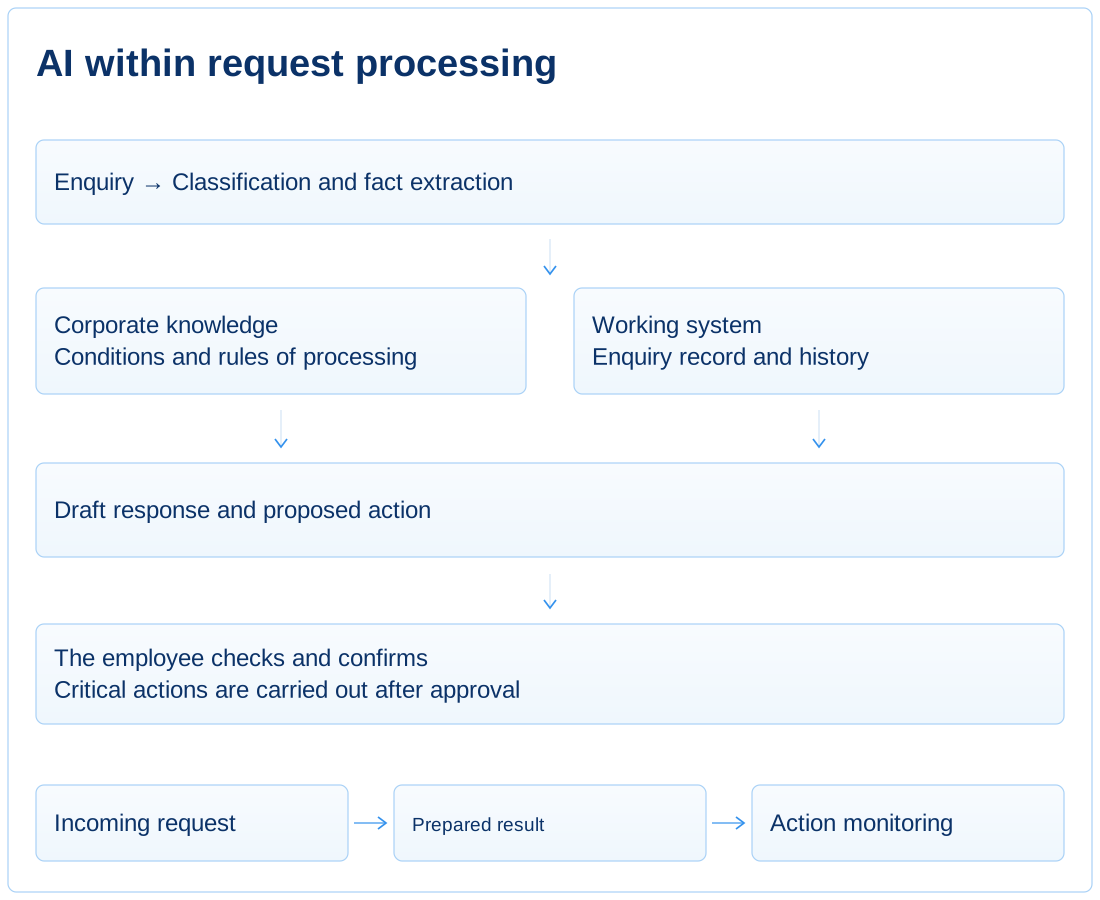
We configure AI as part of the operational workflow. Within defined limits, it can prepare a response, extract facts, complete a record, create a task or propose an action.
The AI outputs the text in a separate interface, and the employee manually transfers the result to the system or document.
We define the model’s role, tool-use rules, output format, confirmation points and actions that require human involvement.
The assistant transfers the result into the required document, task, record or analytical material and stays within the use case’s scope.
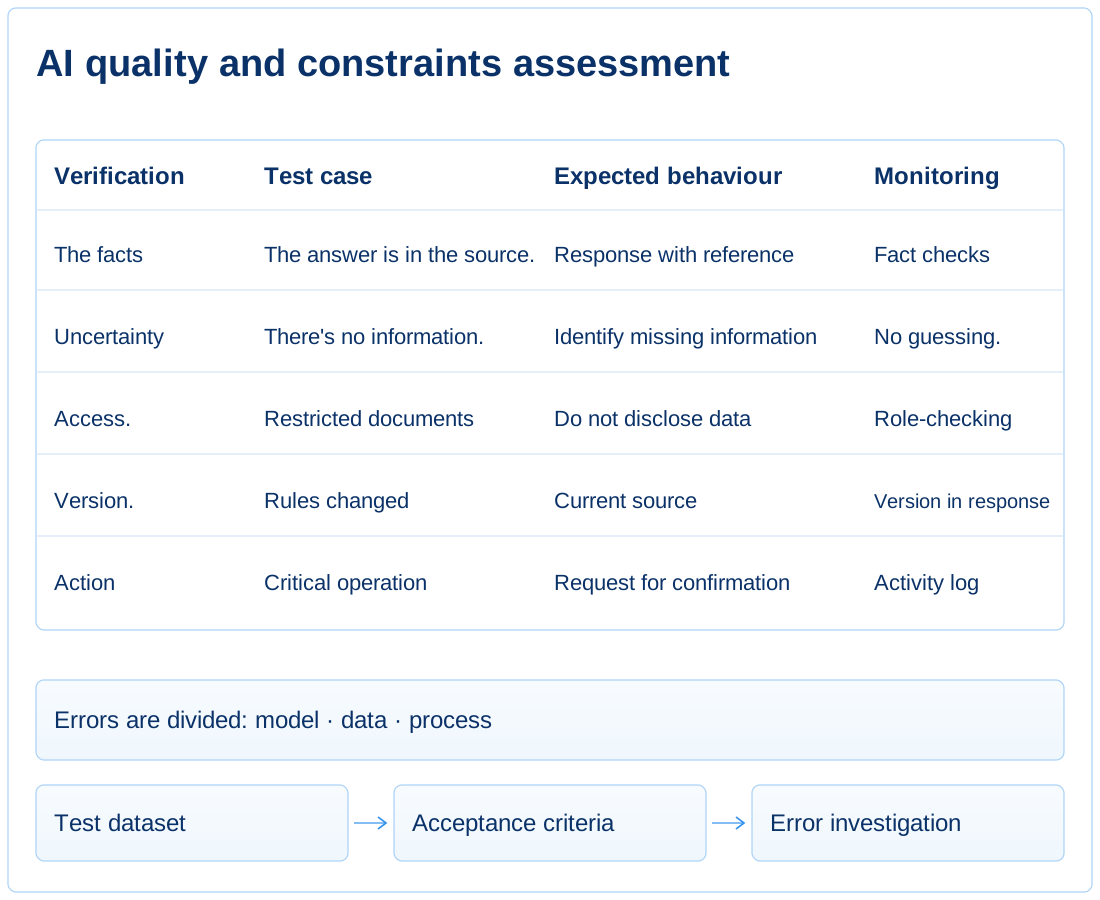
An AI use case is supported as a business-critical system, with a test dataset, error monitoring, logs, an owner and stop rules.
Quality is judged by several successful responses, and once launched, model, data, and process errors are mixed together.
We define tests, accuracy criteria, activity logs, error review procedures, escalation and regular use case reviews.
It is clear why AI got it wrong, who is addressing the root cause, and at what level of risk the scenario should be limited or stopped.
Engagements and deliverables range from selecting AI use cases to enterprise assistants, connected knowledge sources, AI integration into operations and ongoing support.
A portfolio of AI use cases with clear benefits, limitations, data sources, expected impact, risks and launch priorities.
A target model for AI assistants and agents supporting employees, managers, project teams, customer service, document workflows and internal functions.
A framework for AI access to internal documents, procedures, knowledge bases, correspondence, reference data and business data, with access permissions taken into account.
AI use cases within actual work: search, classification, data extraction, drafting, document analysis, request processing, analytical briefs and task creation.
Rules for data use, response verification, action logging, access permissions, owner accountability and limits on AI use in business processes.
An operating model for AI support: roles, metrics, user support, quality monitoring, use case development and the transition from a pilot to reliable ongoing use.
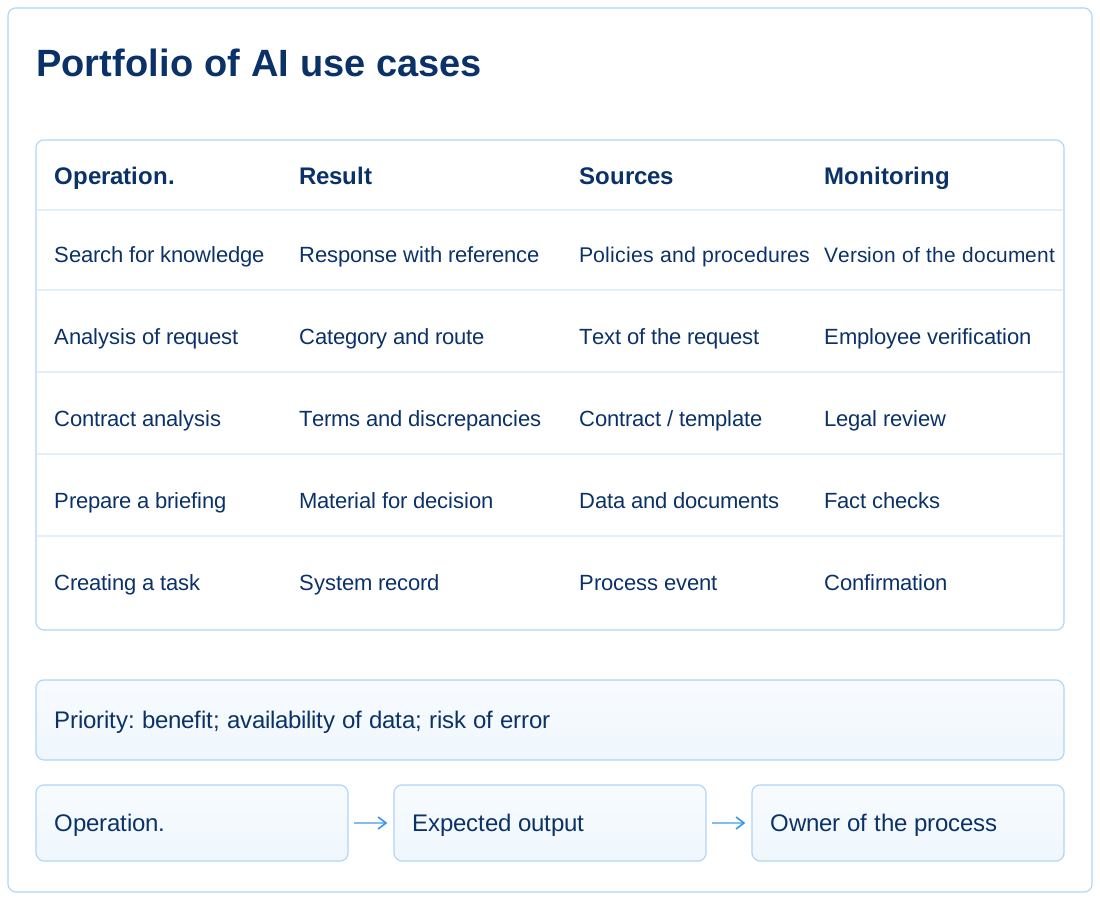
A prioritized set of operations with an assessment of load, risk, data availability, and expected effect.
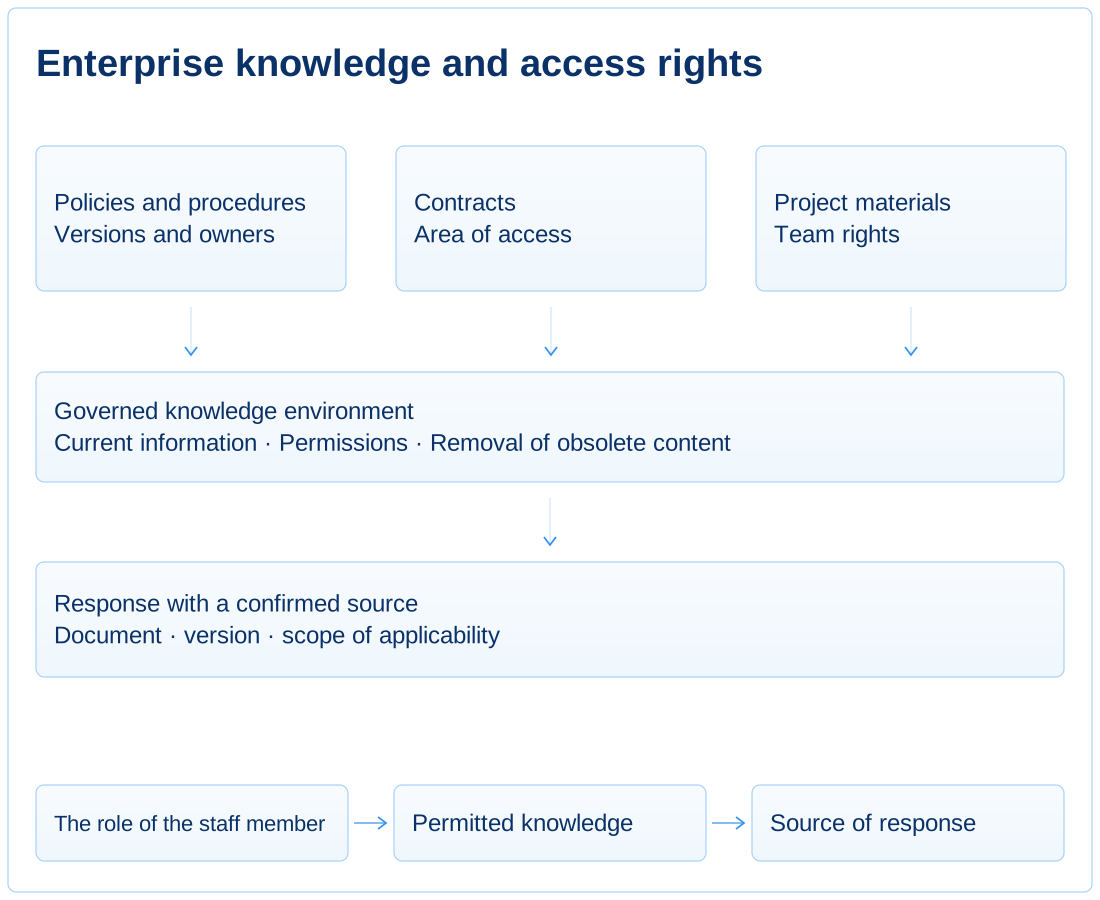
Document, data and system event sources, with owners, versions, permissions and update rules.
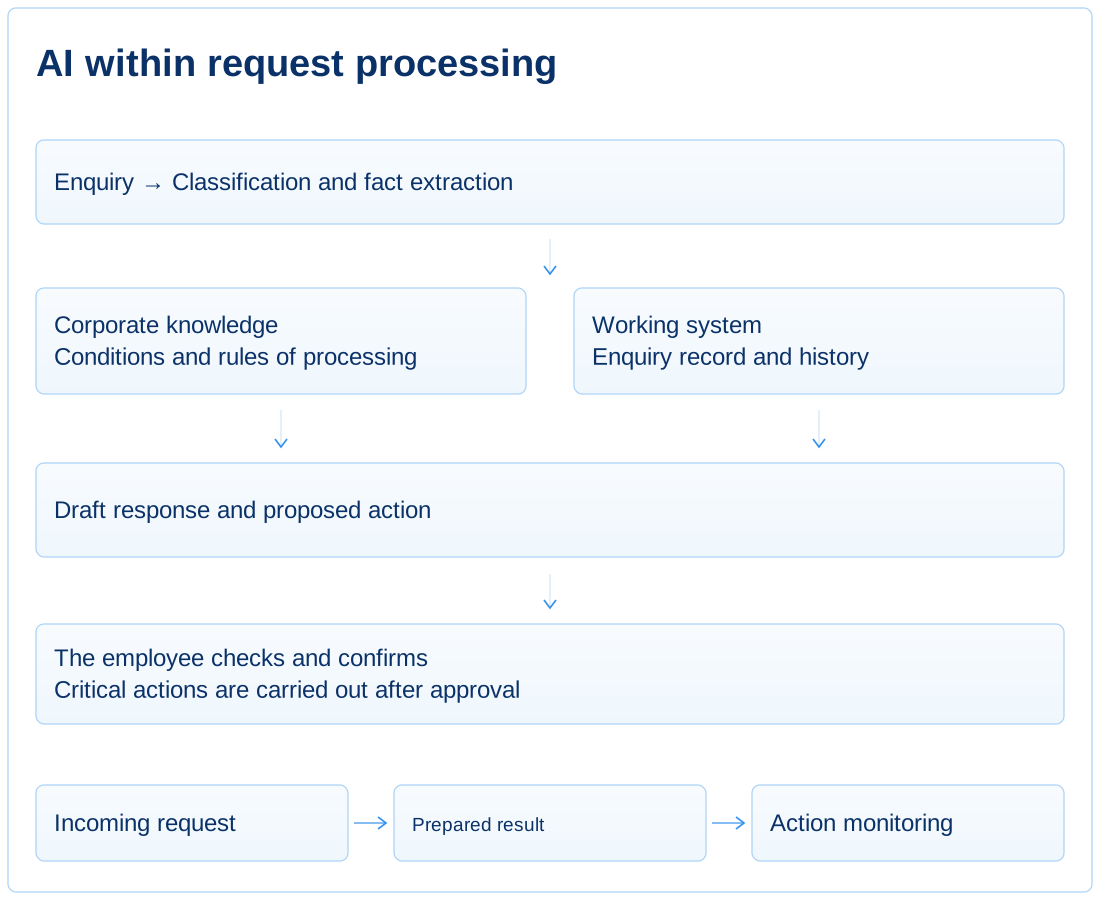
The roles of models, assistants, agents, tools, integrations and human oversight, with limits on autonomy.
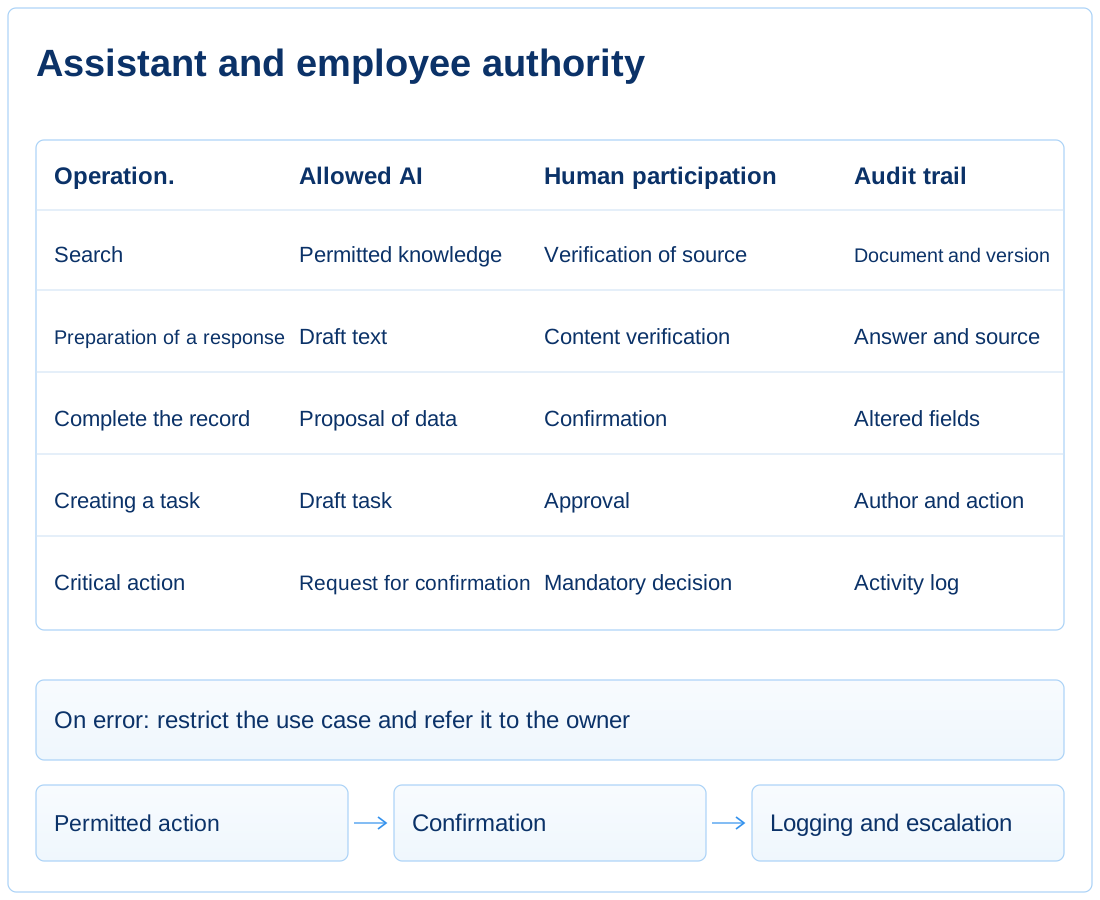
Roles, authorised sources, prohibitions, activity logs, confirmation requirements and use case stop procedures.
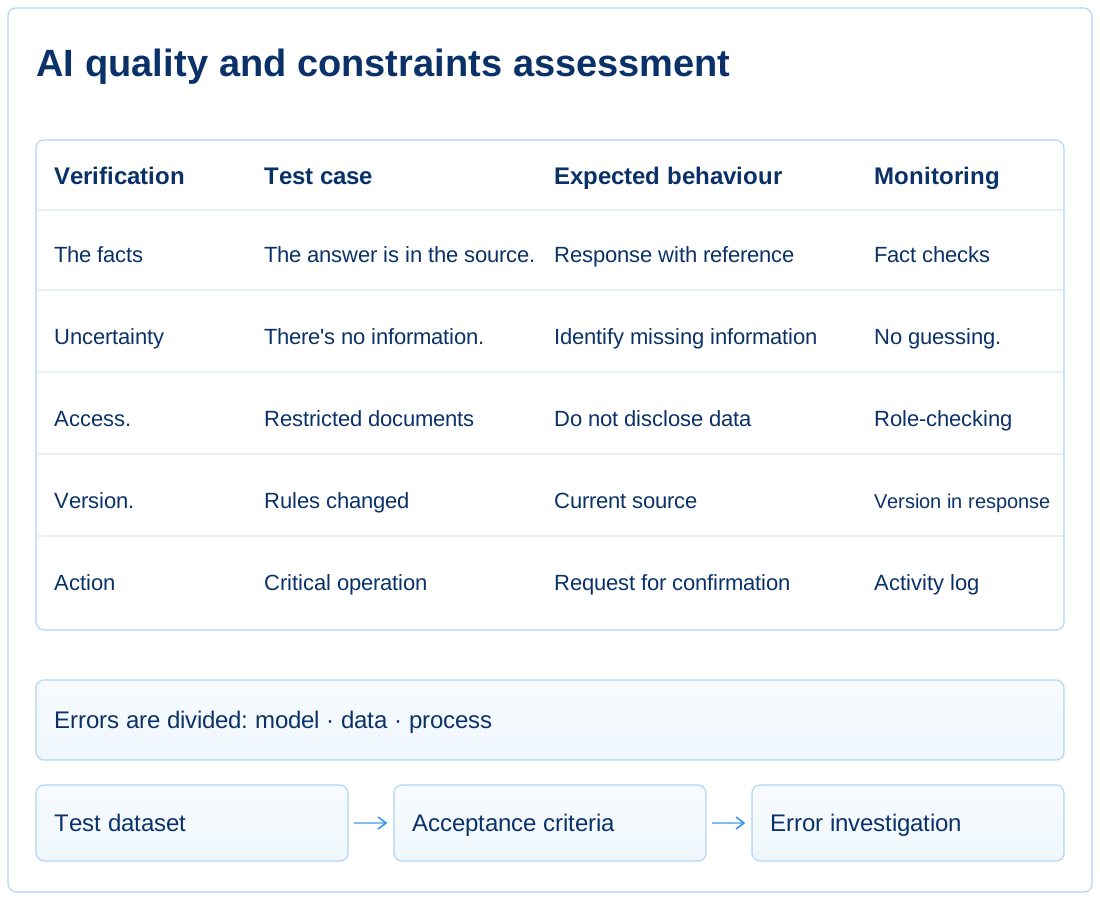
Typical and critical examples, accuracy criteria, rules for evaluating answers and analysis of error categories.
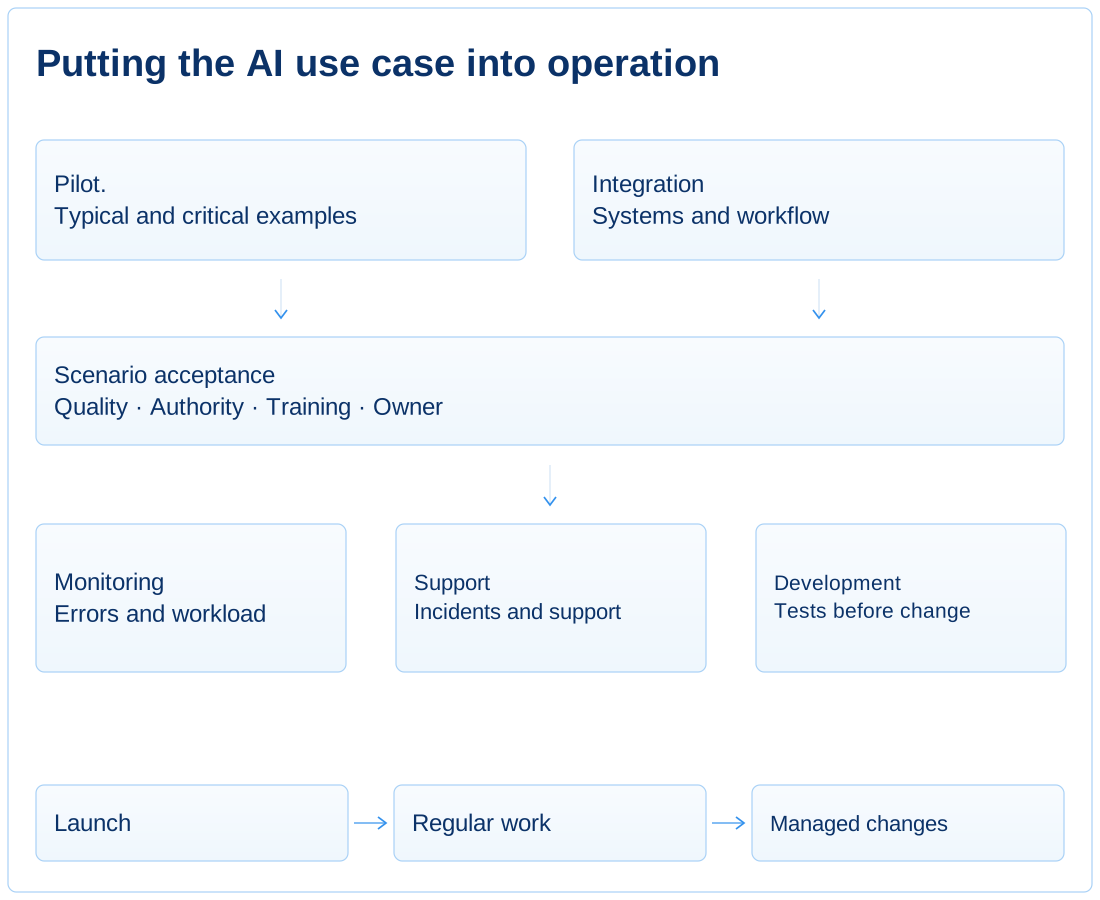
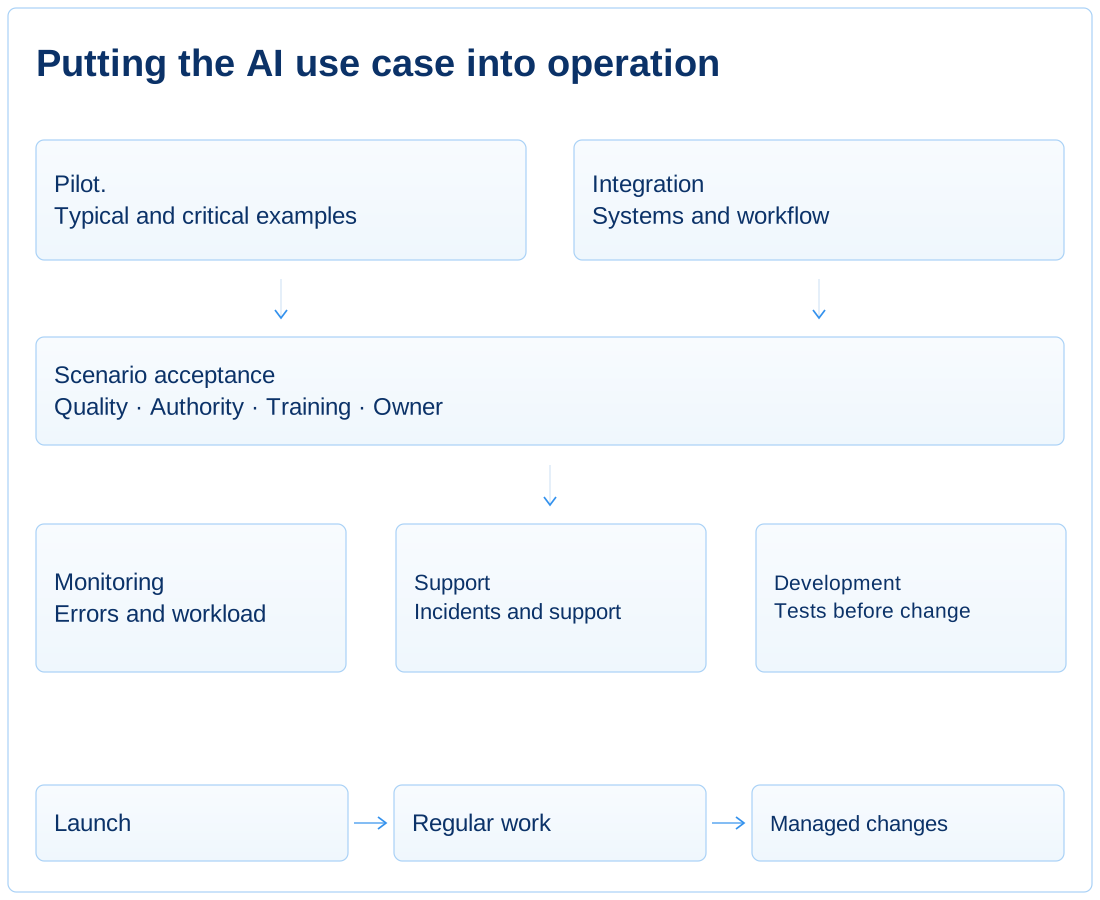
Pilot phases, integrations, user training, launch metrics, support ownership and change procedures.
Results are visible when enterprise knowledge is used in routine operations with defined permissions, cited sources and clear accountability. The number of connected models is not the measure of success.
AI is used as a general chat, and the effect depends on the skills of the individual employee.
Each use case has a defined operation, output format, recording location and next workflow step.
The number of operations delegated to AI and the share of outputs accepted without rework can be measured.
The assistant forms text without clear origin and can use outdated material.
AI works with a managed knowledge base, respects access rights and shows the source of the response.
Every answer can be traced to a document, record, version or system event.
Each employee reads documents in their own way, determines the topic of request and forms a response.
AI applies uniform rules for extracting, verifying, classifying and preparing a draft result.
Errors are categorised by data source, use case logic, model or process.
It is unclear what actions AI can perform itself, and where the confirmation of an authorized employee is required.
Levels of autonomy, confirmation rules, an action log and escalation of non-standard cases are set.
No critical change of obligation, payment, status or data is carried out without established control.
After the demonstration, there is no clear plan to maintain quality or extend AI use.
An AI use case has an owner, metrics, a set of tests, an order of changes, and regular error analysis.
Use case quality is monitored after launch; changes to knowledge, data and rules are controlled.
This practice is needed when a company sees AI’s potential and needs to connect models securely to enterprise knowledge, processes, roles and operational results.